A Better Podcast Player and a New Enjoying Tab


Sofa 5.2 is a big one. A much improved podcast player, a brand new Enjoying tab, a single global search, and a ton of improvements spread throughout the app. Here’s the rundown.
Podcast Player
The player got a lot of love this release, and the biggest change is that it’s now completely free. Chapters, per-show settings, and Voice Boost are unlocked for everyone.
The headline feature is Listen as a Series. You can now follow any podcast like a TV show, in order from the beginning, with a progress ring, a dedicated series view for Up Next, Played, and Skipped, and a new CarPlay Series tab.
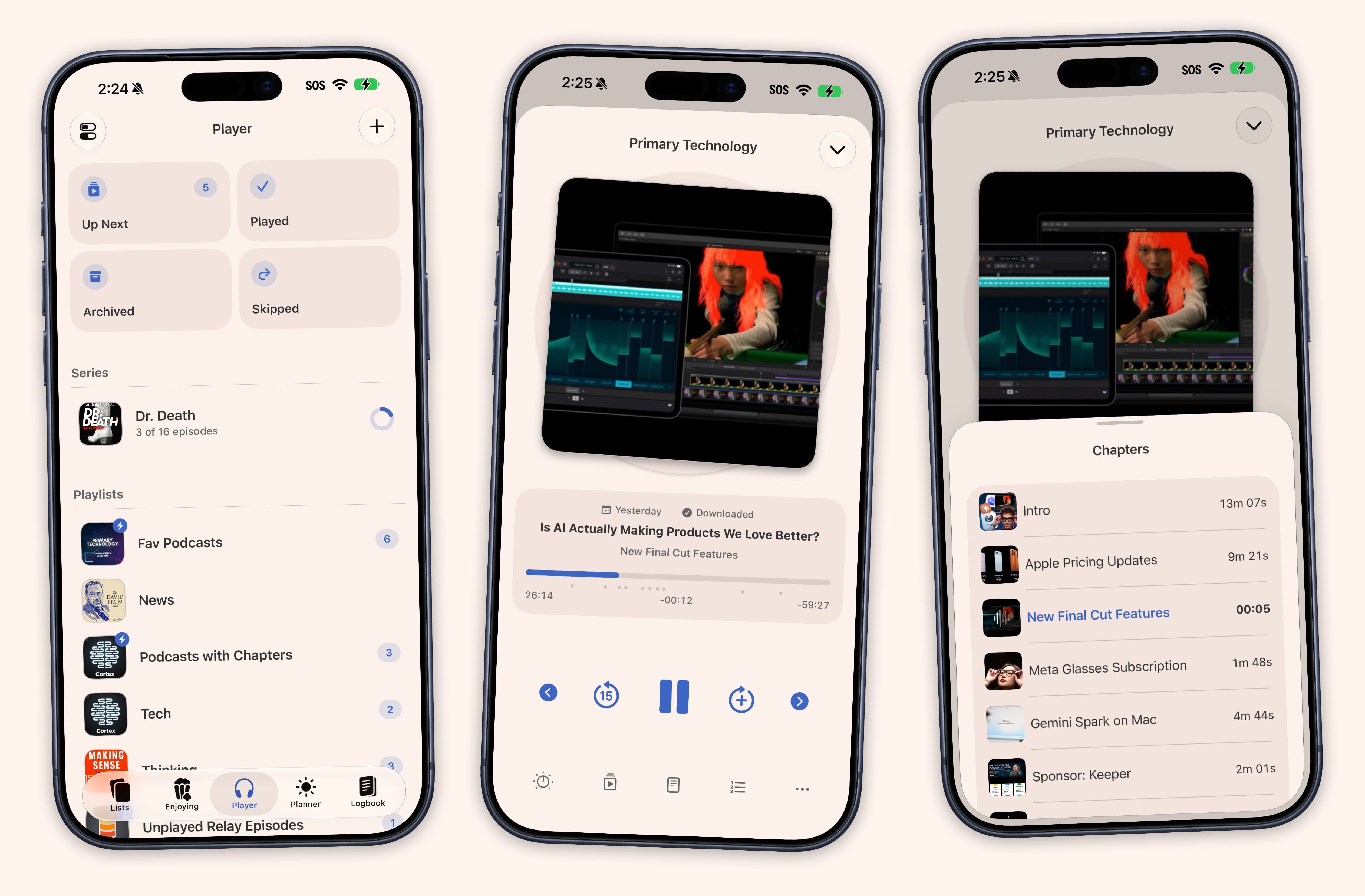
There’s a lot more under the hood:
- Per-podcast settings for playback speed, Voice Boost, seek intervals, Skip Intro, and Skip Outro.
- Better chapters with artwork, scrubber markers on iOS 26 and later, and automatic parsing from show notes.
- New Up Next controls so you can choose whether new episodes land at the top or bottom, either globally or per podcast. Each playlist keeps its own sort, including manual drag order, synced across your devices.
- New playback settings including Smart Resume, Auto Play Next Episode, Only Play Downloaded Episodes, and 21 playback speeds from 1.0x to 3.0x in 0.1x steps.
The Enjoying Tab
There’s a new tab that’s a dedicated home for everything you have in progress: shows, books, games, and more, all in one place.
Smart views surface the right things at the right time with Finish Tonight, On a Roll, and Dusty. You can sort by time remaining or units left, and TV shows can show a “time left” estimate right on the item.
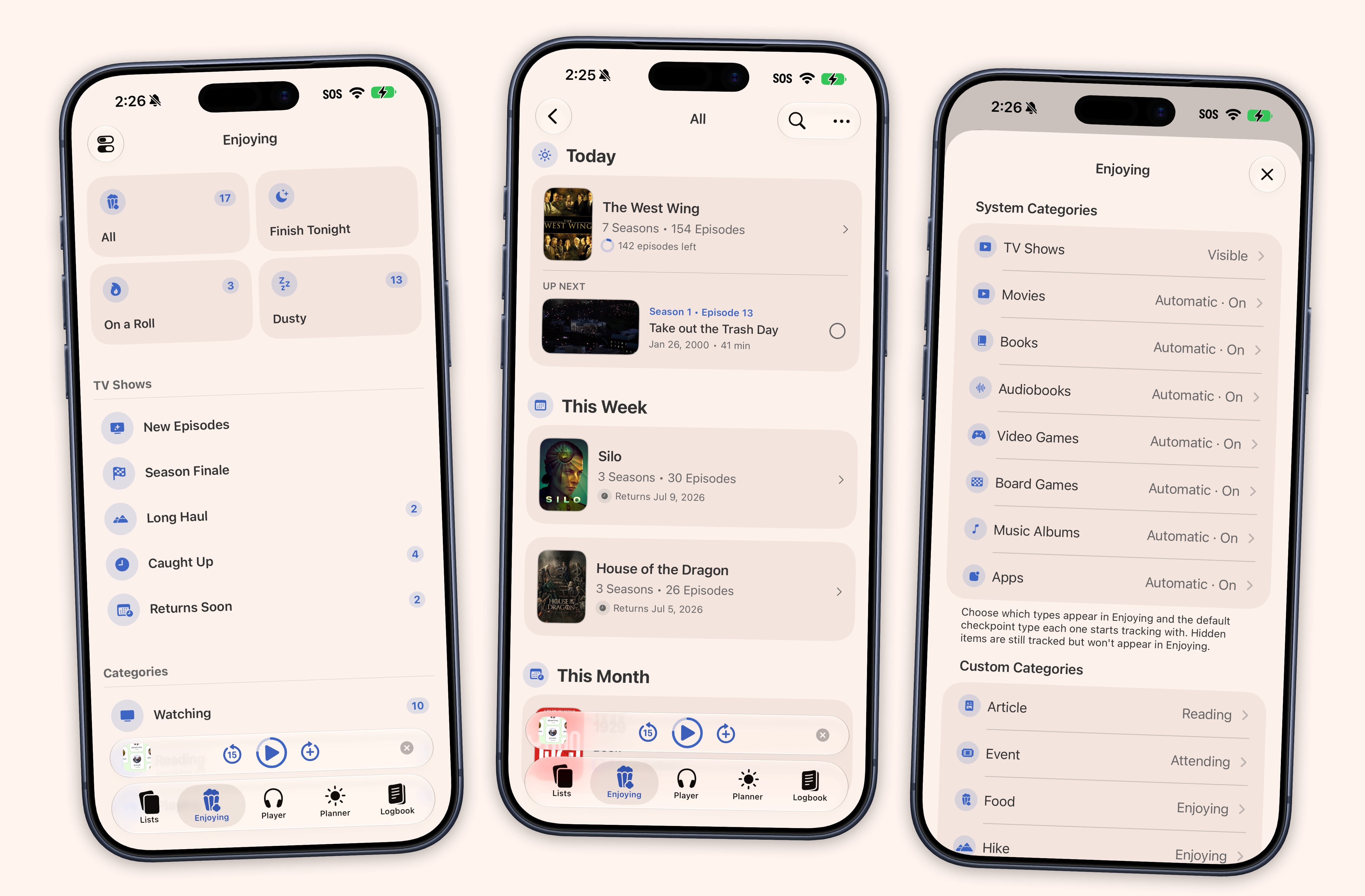
Everyone can now track up to 2 items for free. Super Sofa includes unlimited.
One Global Search
The Search tab is gone. In its place is one global search, a single tap from any tab, or ⌘K on a keyboard. It searches your library first and lets you add new items from the same place.
Settings Sync
Nearly every preference now syncs with iCloud. Set it once and it’s everywhere.
TV Show Tracking
Show tracking picked up collapsible seasons, a Hide Spoilers mode, and a choice of how progress is displayed: Percent, Watched count, or Remaining. There’s also a new “Caught Up” Smart List filter.
Logbook
Log Again brings back one-tap re-logging. Repeated Quick Log taps, podcast episodes, and TV episodes now bundle into tidy collapsed rows instead of flooding the day with separate entries, and TV episodes group by season by default.
And More
- TV Time import now supports the official GDPR export, with full episode-level watch history, rewatches, movies, and custom lists.
- Letterboxd import now brings over written reviews as Notes on each film.
- Smart Lists can filter by title with contains, equals, and excludes, and support multi-range filters.
- Notes can show as a compact “Little Icon” instead of a full inline card.
- New “Date Edited” sort, a new “Course” checkpoint type, and a default checkpoint type per media category.
- Custom categories can be assigned to Enjoying groups.
- Select All in Up Next for quick bulk actions.
- Sofa now restores your last-used tab and podcast mini player position when you reopen it.
- Tappable toasts, so you can tap the confirmation banner to jump straight to what you just changed.
Plus the usual round of fixes: finished TV shows correctly resurface in Enjoying when new seasons arrive, podcast episodes no longer show up under “Unknown Podcast” or appear twice in Played history, and Planner dates no longer appear a day early for anyone in a time zone ahead of UTC.
- See the full release notes
- Download Sofa from the App Store
As always, don’t hesitate to reach out with feedback, issues, and suggestions. I’m always happy to hear from you at support@sofahq.com.
– Shawn