Budgets and Expenses
Last Updated:
Super Sofa Feature
Event planning tools (weather, budgets, and attachments) require a Super Sofa subscription.
Keep track of your spending for any event with Sofa’s budget feature. Create multiple budget scenarios to compare options before committing.
Creating a Budget
- Open an event in the Planner
- Navigate to the Budget section
- Tap + to create a new budget scenario
- Set your currency and budget limit
You can create multiple scenarios — for example, a “Conservative” budget and a “Splurge” budget — to compare before deciding.
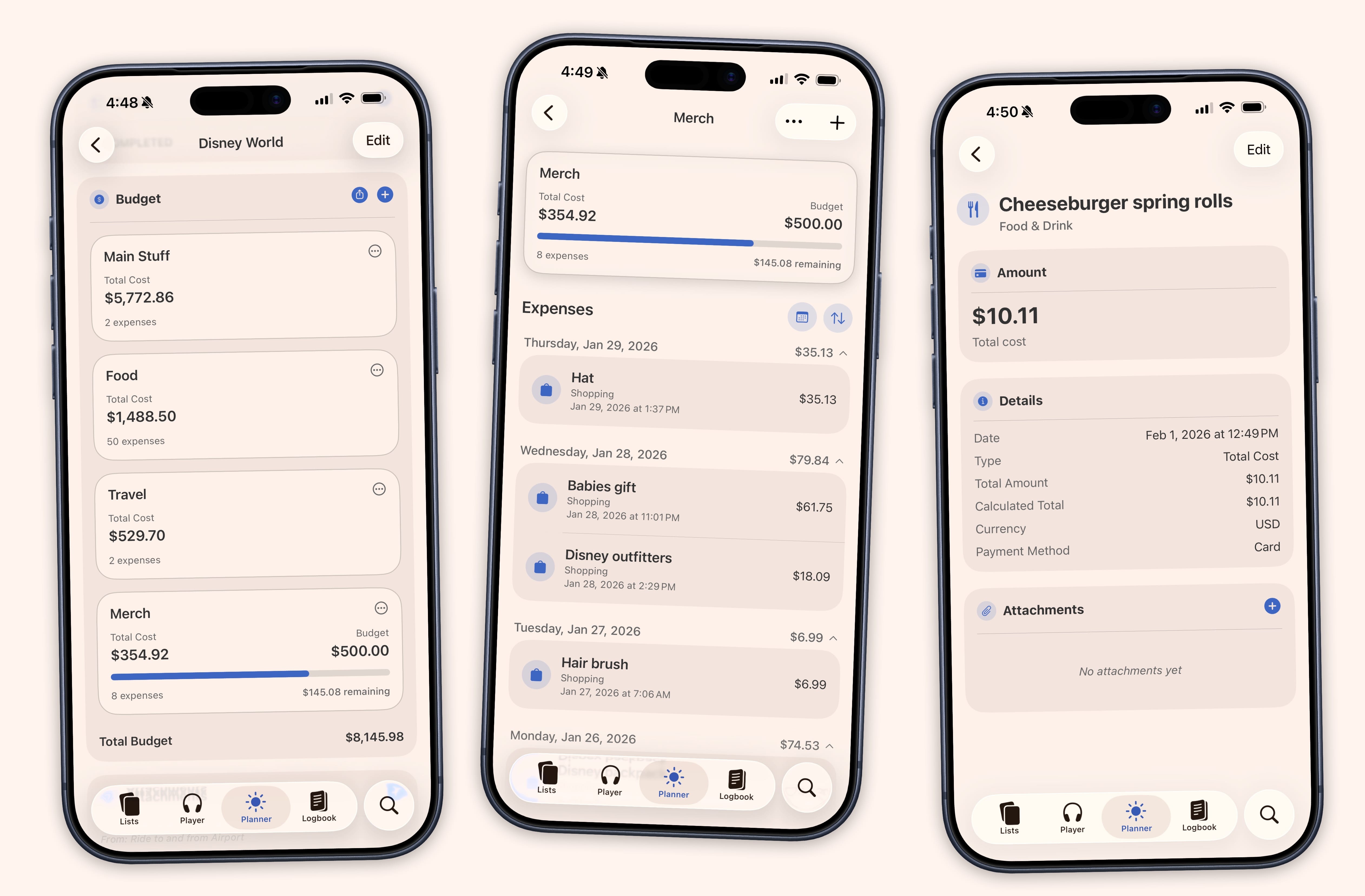
Adding Expenses
Each expense includes:
- Amount — One-time total, per-day (auto-calculated across your event dates), or per-person splits
- Category — Lodging, food, transport, entertainment, and more
- Type — Mark as actual or projected
- Payment method — Track how you’re paying
- Receipt — Attach a photo or PDF as proof
Tracking Progress
A progress bar shows your spending against your budget limit. Sofa will warn you as you approach your limit so there are no surprises.
Linking to Itinerary
Expenses can be linked to specific itinerary locations, making it easy to see how much you’re spending at each stop on your trip.